




----------
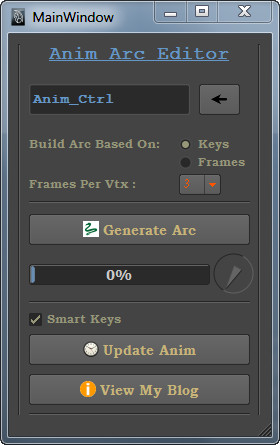
This is the script, with this one can edit animation in 3d view by creating the arc in the same path & update the animation later by deleting the generated arc
If animation is there on translation, then this script is useful.Animated control's translation & rotation attributes should be unlocked.
Location:
----------
Copy 'as_AnimArcEditorMain.pyc' and 'as_AnimArcEditorMain.ui' both files to the following location:
C:\Documents and Settings\User\My Documents\maya\2011 or 2014\scripts
Usage of Script:
------------------
Run these commands from python window
from as_AnimArcEditorMain import *
AnimArcEditor.as_AnimArcEditor()
Updates as_AnimArcEditro_v1.5.0:
--------------------------------------
1. Now if any animation is there on rotation, It will be retrived
Limitations:
-------------
1. It needs to be tested with Global Scaling option
If you use some other version like 2009, then this problem will come.# Error: Bad magic number in C:/Documents and Settings/khlug/My Documents/maya/2009-x64/scripts\as_AnimArcEditorMain.pyc
View My Blog for more videos and help (for Maya 2011):
---------------------------------------------------------------
https://subbuadd.blogspot.com/2010/12/anim-arc-editor-in-3d-view-by-subbu_09.html
Watch All videos at these links:
-------------------------------
https://www.pythonscripting.com
https://www.youtube.com/118subbu
https://vimeo.com/subbu118
Updates:
---------
20.14.10.25 -- Added 2015 version support also
Contact at: subbu.add@gmail.com
Let me know your critics
nJoy
Subbu Addanki
Please use the Bug System to report any bugs.
Please use the Feature Requests to give me ideas.
Please use the Support Forum if you have any questions or problems.
Please rate and review in the Review section.
Please use the Feature Requests to give me ideas.
Please use the Support Forum if you have any questions or problems.
Please rate and review in the Review section.


